👩💼 Startup Founders: Quickly build and launch test versions of new ideas.
👨💻 Product Managers: Build and improve apps without coding.
🧑🎨 Non-Technical Users: Create personal projects or small business sites.
🏢 Enterprise Teams: Build internal tools and workflows faster.
To use Lovable effectively, the most important skill you need is learning how to write strong prompts.
🎯 Best Practices for Prompting in Lovable
Prompts are how you tell the AI what to build. The better your instructions, the better the results.
🗣️ Use Descriptive Language: Be clear and visual. Instead of “dark theme,” say “a dark design with neon green highlights.”
🔁 Use Iterative Prompts: Start with a general idea. Then add more prompts to refine details like layout, color, or animations.
🧩 Show Examples: Include short examples of what you like. This helps the AI match your desired style.
🧠 Ask Lovable to Help Improve Prompts: You can even tell the AI to suggest a better version of your prompt.
📝 Be Clear and Detailed: Treat the AI like a new teammate. Explain who the website is for, what it should do, and how it should feel.
💡 Ask Open-Ended Questions: These questions help the AI be creative and suggest ideas you might not have thought of.
🏗️ Architecting Your Website with a Single Prompt
Your first big prompt is the most important. A strong architectural prompt can create a full website in minutes. It should include all the essential details.
🌐 Define the Website Type: Explain what kind of website you want, like a portfolio, store, or blog.
🎨 Describe the Style: Include colors, fonts, and overall mood. Example: “A clean modern look with blue and grey tones.”
⚙️ List the Main Features: Mention things like smooth scrolling, contact forms, or payment systems.
📚 Outline the Sections: List sections like About, Projects, Blog, and Contact.
💻 Add Technical Needs: Make sure you ask for a responsive design so it works on phones and computers.
Once you have all these parts in your prompt, you are ready to let Lovable do its thing.
📝 Prompt Templates for Portfolios
Below are some examples of strong ones you can customize.
🧑💼 Template 1:
“Build a modern portfolio with a light theme. Include a Home section with my name, tagline, and a professional profile image. Add sections for About Me, Skills, Projects with screenshots and descriptions, Blog, and Contact with a form. Use blue and grey colors, clean sans-serif fonts, and smooth scrolling. Make it fully responsive.”
💻 Template 2:
“Create a dark developer portfolio with neon green text and a profile image near the bio section. Include Bio, Projects with GitHub links, Latest Blog Posts, and Contact with a resume download button. Use monospace fonts, add smooth scrolling, and ensure it works well on all devices.”
🎨 Template 3:
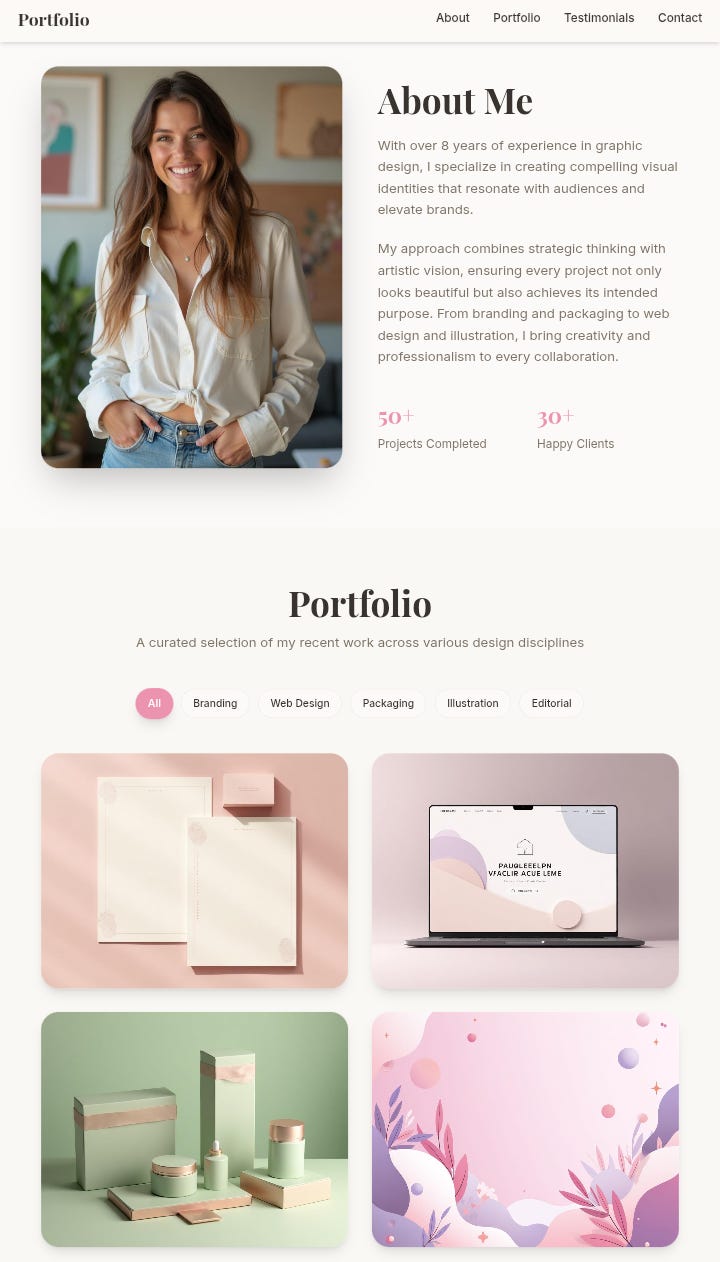
“Design a stylish portfolio for a graphic designer. Include a large profile image in the About section to show personality. Focus on big visuals and gallery-style project showcases with category filters. Add client testimonials, Contact with social links, and pastel colors with elegant serif fonts for a luxurious feel.”
Here's a preview of how it looks on a mobile device:
What All Good Prompts Share
🧭 Clear structure and named sections: So users can navigate easily.
🎨 Specific visual styles: That include colors, fonts, and layout details.
🧱 Important features: Such as, contact forms, galleries, and download buttons.
📱 Responsive design: So the website looks great on phones, tablets, and desktops.
Once the AI creates your site, the next step is to publish it online.
🌟 Launching Your Lovable Website
Lovable makes this easy with three main options.
⚡ Publish on a Lovable Subdomain: Click “Publish,” choose a name, and your site goes live in minutes. Great for beginners or quick demos.
🌐 Deploy via GitHub and Hosting Platforms: Export to GitHub, then connect to Netlify or Vercel. Perfect for professional sites that need custom domains.
💽 Deploy on Your Own Server: Export the code and upload it to your private server using Vultr or DeployHQ. This is for advanced users who want full control.
🚧 Managing Your Workflow: Pricing and Credits
Lovable uses a credit system that limits how many AI tasks you can do each month.
Plans vary by how many credits and features they include:
💰 Free Plan: 30 credits per month. Public projects only. 💼 Pro Plan: $25 per month with 100 credits. Lets you make private projects, custom domains, and remove the badge. 👥 Business Plan: $50 per month with more credits and team tools. 🏢 Enterprise Plan: Custom pricing with thousands of credits and support.
Credits are used when you generate code or make design changes.
🗓️ Daily credits reset every 24 hours, and monthly credits roll over on paid plans. You cannot buy extra credits separately, but you can upgrade your plan to get more.
Final Takeaway 🚀
Lovable lets anyone build websites faster and smarter using natural language. Whether you are a beginner or an experienced developer, you can bring your ideas to life in record time.
To get extra credits for Lovable, go to my tools page: